
You do not need a bigger prompt library.
You need a Skill.
I was deep in the Notion library era. Folders of prompts. Tagged for tone, format, platform. I copy, paste, tweak, repeat. It felt productive. It was not.
Then I uploaded my first Skill. Typed one line. Watched it plan a full week of content for our school group, write the copy, and spit out a finished LinkedIn infographic on brand. No prompt stacking. No copy paste tax. No reminding it who we are.
That is the shift. And if your AI workflow still lives in a prompt vault, you are about to feel it.
What Actually Changed
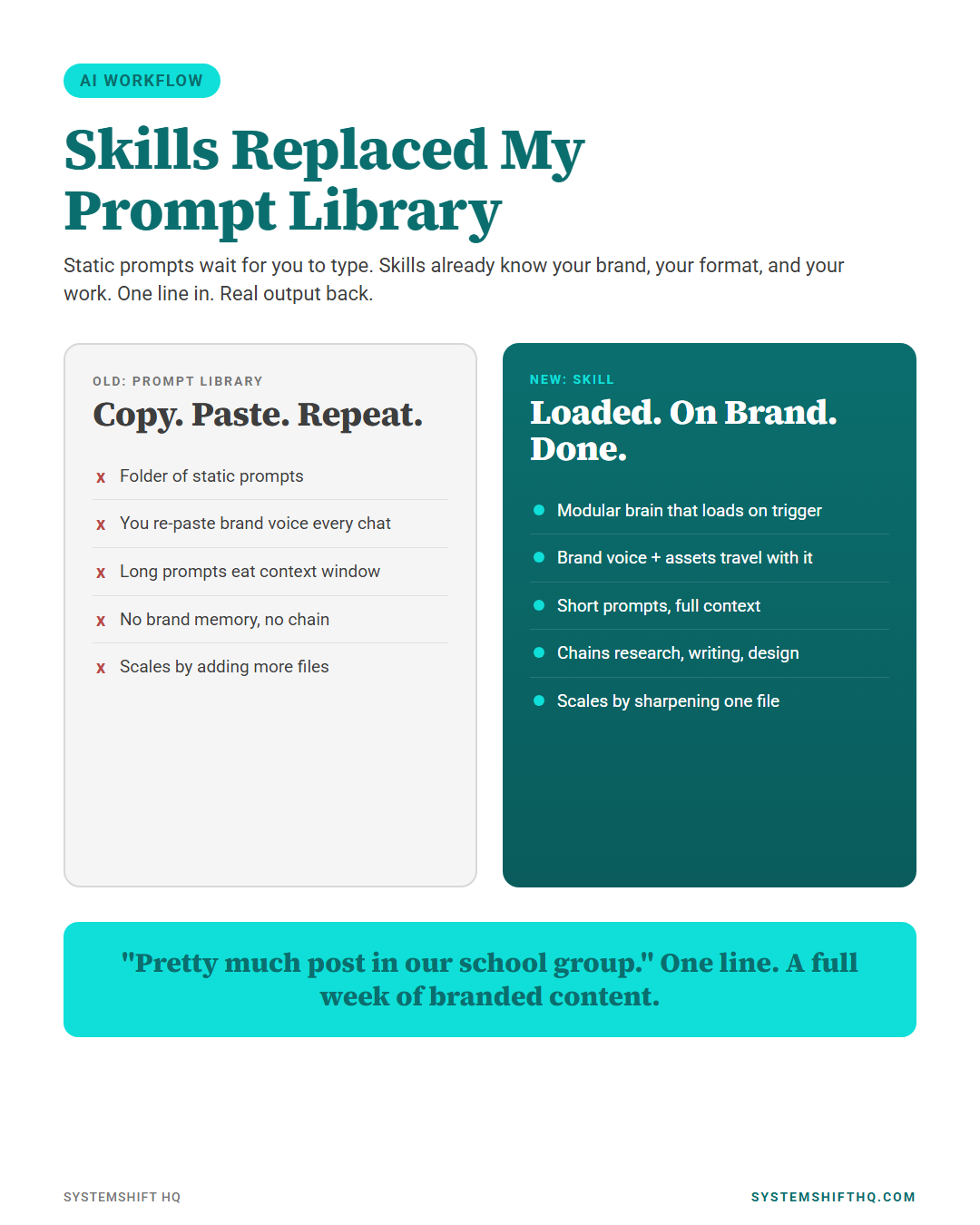
Prompt libraries are static. They sit there. You do the work of finding, copying, editing, and pasting every single time. They scale by adding more files, which makes them slower, not faster.
A Skill is different.
A Skill is a folder of instructions, scripts, and brand context that the AI loads only when the task matches. It does not need you to dig. It does not need you to remind it that we use turquoise on dark teal, that we hate corporate jargon, that every carousel ends with a CTA. The Skill brings that with it. Every time.
Anthropic shipped Skills as the format for this. The structure is simple: a SKILL.md file with a name, a description, trigger keywords, and the instructions. Drop in scripts, brand assets, voice guides. Now the AI has a brain you built, not a prompt you typed. If you want context on where Claude is going as a platform, we covered the recent Claude updates that matter for service businesses earlier this year.
Custom GPTs sit in the middle. Easier to build than a Skill. Locked to OpenAI. Not composable across agents. Fine for a chatbot. Useless for a real content engine. We broke down the difference between Claude Chat, Cowork, and Code if you are still untangling which Claude product does what.
The Receipt
Here is what happened in the video that started this post.
I told the AI: "Pretty much post in our school group." That was it. Eleven words.
The Skill loaded. It pulled our brand voice. It read our past posts. It checked our agent roster. It planned the entire week of content in our format. It wrote a LinkedIn infographic with our colors, our fonts, our framing. Done.
If I had tried that with a prompt library, I would have spent forty minutes prompting before I got the first usable draft. The Skill did it in one pass.
That is not a productivity tweak. That is a different operating model.
Skills vs Prompt Libraries vs Custom GPTs
Three formats. They are not the same.
Prompt library. A folder of text files. Strong for versioning. Portable across any model. Manual to use. Eats context window when you stack them. Treats every chat like a fresh start.
Custom GPT. A bot with a system prompt and a few uploaded files. Friendly for non technical users. Locked to ChatGPT. Limited at chaining. Not portable to your agents or your codebase.
Skill. A modular capability pack. Loads on trigger. Carries instructions, scripts, brand assets, and tools. Composable across tasks. Built once, reused forever. Lives in your repo or workspace, not a vendor silo.
The library wins on portability. The GPT wins on ease. The Skill wins on real work.
What I Noticed in the First Week
Three things hit me fast.
1. The prompt got shorter, not longer.
A prompt library trains you to write longer prompts. More context, more rules, more "do not do this" lines. A Skill flips it. You write less because the brain is already loaded. "Post about Skills replacing prompt libraries" became a complete brief.
2. The output got more on brand, not less.
Static prompts drift. You forget to paste the brand line. You copy an old version. The voice slips. A Skill carries the brand every time. The output starts on brand and stays there.
3. Real work happened, not just text.
The Skill ran scripts. Pulled stats. Generated the infographic. Wrote the captions. A library can describe the work. A Skill does the work. If you want to see what that looks like in practice on the service-business side, we walked through 3 AI agents every business owner can use, and the same logic stacks on top of a Skill.
The Three Mistakes Still Keeping People Stuck
I see these everywhere. Service owners. Creators. Agency teams. Same trap.
Mistake 1: Stacking prompts in one chat.
You paste the brand voice prompt. Then the carousel format prompt. Then the CTA prompt. Then the topic. The window blows up. The model loses the early context. The output is generic. This is a Skill problem solved by a Skill.
Mistake 2: Treating prompts as disposable text.
Copy paste with no version control. No history of what worked. Every team member has a slightly different copy of the same prompt. There is no engine. There is duct tape.
Mistake 3: Staying linear.
Prompt packs train you to think one chat at a time. The work is not one chat. The work is research, plan, write, design, post, follow up, measure. A Skill chains that. A prompt cannot.
How to Convert Your Prompt Pack Into a Skill in Three Steps
You do not need to rebuild from scratch. Your prompts are the raw material. The Skill is the housing.
Step 1. Pick the workflow you repeat the most.
Not your favorite prompt. Your most repeated workflow. For a service business, that is usually weekly content, lead follow up, or a sales process. For a creator, it is your post format and your research routine.
Step 2. Build the SKILL.md.
Open a folder. Create a file called SKILL.md. Put a short YAML header at the top with three fields: name, description, and the trigger phrases the AI should listen for. Below that, paste your best prompt for that workflow. Add a short brand section. Add the rules you keep forgetting to remind it about. That is your first Skill.
Step 3. Add the assets and ship it.
Drop in your brand colors, your voice guide, your past examples, your scripts. Save. Upload to your AI workspace. Test it with a real task. If the output is on brand and the work is done, ship it. If not, fix the SKILL.md. The fix lives in one file, not in every chat you ever start.
That is the whole loop. Build, test, ship, sharpen.
Why This Matters for Service Businesses
If you run a service business, your time is not in the writing. Your time is in the chasing. Leads, follow ups, content, reviews, fires, repeat. The reason most owners stop posting is not that they cannot write. It is that the system to keep posting is broken.
A Skill is the fix.
You build the content Skill once. It knows your brand, your audience, your formats, your CTAs. You feed it a topic. It returns a week of content. You approve, post, and move on. No prompt vault. No copy paste tax. No "remind me what we sound like" loop. This is the same systems-first move we make with AI tools for business automation and with marketing automation for small business. Build the system once. Run it forever.
That is what scales.
Frequently Asked Questions
What is a Claude Skill in plain English?
A Claude Skill is a folder with a SKILL.md file, instructions, and assets. Claude loads it only when the task matches the trigger. It carries your brand and tools every time, so you do not have to.
Are Skills better than custom GPTs?
For real work, yes. Skills are composable, portable to your agents, and chain across tasks. Custom GPTs are fine for a single chatbot. They do not scale into a content engine or an agent stack.
Do I need to be a developer to build a Skill?
No. The minimum Skill is a folder with one Markdown file. If you can write a prompt and save a file, you can build a Skill. Add scripts later when you want to automate the parts that are still manual.
Will Skills make my prompt library useless?
Not useless. Your prompts become the raw material for Skills. Pick your most repeated workflows, wrap them in a SKILL.md, and your library starts paying you back instead of sitting there.
Bottom Line
Prompt libraries trained you to copy, paste, and remind the AI who you are. Skills flip that. The brain is loaded. The brand is loaded. The work runs. You stop typing the same context into every chat and start shipping.
If you are a service owner or creator who is still in the library era, pick one workflow this week. Wrap it in a Skill. Watch what happens when the AI shows up already knowing your brand.
That is the shift. The prompt library is the past. The Skill is the system.
Want help building the first one for your business? Book a SystemShift call and we will turn your most repeated workflow into a Skill that runs without you.
Ready to Automate Your Business?
Book a free strategy call and we'll map out exactly what to build first.
Book Your Call
Join the Conversation