
- SBA microloans (up to $50K) and 7(a) loans both cover technology investments
- CRM costs range from $5K-25K all-in for the first year
- A good CRM pays for itself in recovered leads within 90 days
The Short Answer Is Yes. The Longer Answer Is "Why Aren't You Already Doing This?"
Here's something that blows most small business owners' minds.
The SBA will loan you money to buy software.
Not just hardware. Not just equipment you can touch. Actual software subscriptions. Implementation costs. Training for your team. Custom development.
CRM systems qualify under every major SBA loan program. And most business owners have no idea.
They're out here losing leads because they're tracking prospects in a spreadsheet. Or worse, in their head. Meanwhile, there's government-backed financing sitting there specifically designed to fix that problem.
Let's break down exactly how to use SBA funding to get a CRM system up and running, what it costs, and why the math makes it one of the smartest investments you can make.
What SBA Loans Actually Cover (It's More Than You Think)
The SBA doesn't hand you a list of approved products. They approve categories of business expenses. And technology is one of the biggest.
Here's what qualifies under SBA loan programs for CRM specifically:
Software Subscriptions
- Monthly or annual CRM platform fees
- Add-on modules (AI chatbot, email marketing, SMS)
- Integration tools that connect your CRM to other systems
Implementation and Setup
- Data migration from spreadsheets or old systems
- Custom pipeline and workflow configuration
- Integration with your website, email, and phone systems
Training
- Staff training on the new system
- Ongoing coaching and optimization
- Documentation and process development
Custom Development
- Custom automations and workflows
- API integrations with industry-specific tools
- Custom reporting dashboards
That's your entire CRM project. Funded. At interest rates between 6-9%. With repayment terms up to 6 years on a microloan or 10 years on a 7(a).
Compare that to putting $15K on a business credit card at 22% interest. The SBA route isn't just smarter. It's dramatically cheaper.
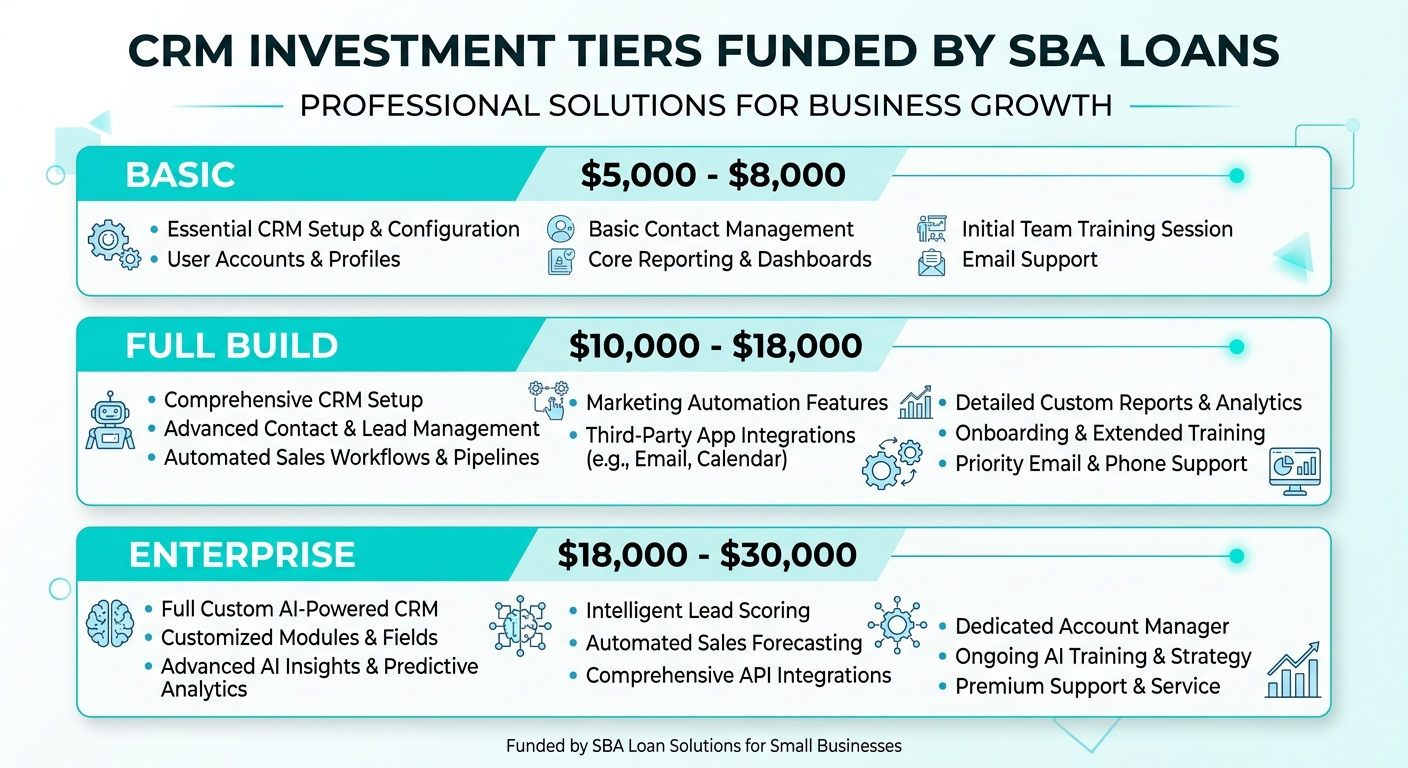
The Real Cost Breakdown: What a CRM Investment Looks Like
Let's get specific. Here's what a full CRM implementation actually costs for a small business:
Option 1: Basic Setup ($5K-8K First Year)
| Item | Cost |
|---|---|
| CRM Subscription (e.g., GoHighLevel $97/mo) | $1,164/yr |
| Basic Setup and Migration | $2,000-3,000 |
| Team Training (4-8 hours) | $1,000-2,000 |
| Total First Year | $4,164-6,164 |
This gets you a working CRM with your contacts migrated, basic pipelines built, and your team trained. Good starting point for businesses with fewer than 500 contacts.
Option 2: Full Implementation ($10K-18K First Year)
| Item | Cost |
|---|---|
| CRM Subscription (GoHighLevel $297/mo) | $3,564/yr |
| Full Setup, Migration, and Integration | $5,000-7,000 |
| Custom Automations (5-10 workflows) | $3,000-5,000 |
| Training and Optimization (ongoing) | $2,000-3,000 |
| Total First Year | $13,564-18,564 |
This is the full stack. CRM with AI chatbot, automated follow-up sequences, review management, funnel builder, and custom workflows. This is what most of our SystemShift clients invest in.
Option 3: Enterprise-Level ($18K-30K First Year)
| Item | Cost |
|---|---|
| CRM Subscription ($297/mo + add-ons) | $4,500/yr |
| Custom Development and API Integrations | $8,000-15,000 |
| Multi-Location Setup | $3,000-5,000 |
| Advanced Training and SOP Development | $3,000-5,000 |
| Total First Year | $18,500-29,500 |
This is for businesses with multiple locations, complex sales processes, or industry-specific integration needs. Still well within SBA microloan range.
How a CRM Pays for Itself (The Lead Recovery Math)
Here's the part that makes the ROI undeniable.
Most small businesses are losing 30-50% of their leads to poor follow-up. Not because they don't care. Because they're busy. Because they forget. Because the sticky note fell off the monitor.
Let's do the math on a typical service business:
Current situation (no CRM):
- 80 leads per month
- 40% get a follow-up within 24 hours
- 15% close rate on followed-up leads
- Average job value: $2,500
That's: 80 x 0.40 x 0.15 x $2,500 = $12,000/month in closed revenue
With a CRM and automation:
- Same 80 leads per month
- 100% get a follow-up within 5 minutes (automated)
- 22% close rate (faster follow-up = higher conversion)
- Same $2,500 average job value
That's: 80 x 1.00 x 0.22 x $2,500 = $44,000/month in closed revenue
The difference: $32,000 per month. $384,000 per year.
Even if you cut those numbers in half to be conservative, you're looking at $192K in additional revenue from a $15K investment.
The CRM doesn't just pay for itself. It pays for everything else.
Read our breakdown of the best CRM for small business to see which platforms deliver these results.
How to Include CRM in Your SBA Loan Application
This is where most people get stuck. They know they want a CRM. They know SBA loans exist. But they don't know how to connect the two.
Here's exactly how to do it.
Step 1: Define the Business Need
Your SBA application needs to show why you need the technology. Keep it simple:
- "We currently track leads manually, resulting in delayed follow-up and lost revenue"
- "We need a CRM system to automate customer communication and improve retention"
- "Technology investment will reduce labor costs and increase conversion rates"
Don't overcomplicate it. The SBA wants to see that the investment will help your business grow.
Step 2: Get Implementation Quotes
You'll need documentation. Get quotes from:
- Your CRM provider (subscription costs)
- Your implementation partner (setup, training, customization)
- Any third-party integrations
We provide detailed project proposals for all our CRM clients that are formatted specifically for SBA loan applications.
Step 3: Build the ROI Projection
Include a simple projection showing:
- Current lead volume and close rate
- Projected improvement with CRM
- Expected revenue increase
- Payback timeline
Keep it realistic. Don't project 500% growth. Show 20-30% improvement and let the math speak for itself.
Step 4: Choose the Right SBA Program
SBA Microloan (up to $50K)
- Best for: CRM-only projects
- Terms: Up to 6 years
- Rate: 6-9%
- Approval: Faster, less paperwork
SBA 7(a) Loan (up to $5M)
- Best for: Larger technology overhauls including CRM
- Terms: Up to 10 years for equipment/software
- Rate: Variable, currently 8-10%
- Approval: More documentation required
For most small businesses, the microloan is the move. $15K-25K covers a full CRM implementation with room to spare.
Already thinking about automating beyond CRM? Check out our guide on SBA loans for AI automation to see the full picture.
Why GoHighLevel Is the CRM We Recommend (And Fund Through SBA)
We're not platform-agnostic on this one. For small businesses, GoHighLevel is the platform that delivers the most value per dollar.
Here's why:
All-in-one pricing. Most CRMs charge separately for email marketing, SMS, funnel building, appointment scheduling, and automation. GoHighLevel includes all of it. One subscription. One login. One bill.
Built for small business. HubSpot is great if you have a 10-person marketing team. Salesforce is great if you have a dedicated admin. GoHighLevel is built for businesses where the owner is also the sales team, marketing department, and customer service rep.
Automation-first. Every feature is designed to run without you. Leads come in, get followed up automatically, get moved through your pipeline, and get asked for reviews after the job is done. You only touch it when a human conversation is needed.
Cost comparison:
| Platform | Monthly Cost (comparable features) |
|---|---|
| HubSpot (Sales + Marketing Hub) | $800-1,600/mo |
| Salesforce + Pardot | $400-1,250/mo |
| GoHighLevel | $97-297/mo |
Not sure which tier is right for you? Our pricing page breaks down exactly what you get at each level.
Want to see how GoHighLevel compares head-to-head? Read our GoHighLevel vs HubSpot breakdown.
The Hidden Costs of NOT Having a CRM
Let's flip it. What's it costing you to keep running without one?
Lost leads: Without automated follow-up, 50%+ of your leads go cold. At $2,500 per job, losing just 10 leads per month costs you $25,000/month.
Wasted time: Manual data entry, searching through emails for contact info, writing follow-up texts one by one. That's 10-15 hours per week of work a CRM does in seconds.
No visibility: Without pipeline tracking, you don't know where deals are stuck. You can't see which lead sources are working. You're flying blind.
Inconsistent follow-up: Some leads get three touchpoints. Some get one. Some get zero. Your close rate is a roulette wheel instead of a system.
Team scaling problems: You can't hand off your "system" to a new hire when your system is "I keep it all in my head." A CRM is the foundation for growth.
Add it up and most businesses are bleeding $20K-50K per year in lost revenue because they don't have a CRM. That's not a technology gap. That's a money leak.
See the cheapest CRM options if budget is your main concern. There's something at every price point.
The 30-Day CRM Launch Plan
Don't overthink this. Here's how to go from nothing to a fully operational CRM in 30 days:
Week 1: Foundation
- Choose your platform (GoHighLevel recommended)
- Import contacts from spreadsheets, email, and phone
- Set up basic pipeline stages
Week 2: Automation
- Build automated lead follow-up sequence (email + SMS)
- Set up appointment booking with calendar sync
- Create missed-call text-back automation
Week 3: Integration
- Connect CRM to your website forms
- Set up landing pages with direct CRM integration
- Enable review request automation
Week 4: Optimization
- Train your team on daily CRM workflow
- Set up reporting dashboard
- Fine-tune automation timing and messaging
By day 30, every lead gets followed up within minutes. Every appointment gets confirmed automatically. Every completed job triggers a review request. And you have a dashboard showing exactly where your revenue is coming from.
That's not a tech upgrade. That's a business transformation.
Learn how the whole system connects in our how it works guide.
Your Next Step
Here's what I'd do if I were you:
- Calculate your lead leak. How many leads per month don't get followed up within an hour? Multiply by your average job value. That's what a CRM recovers.
- Get a quote. Talk to a CRM implementation partner (like us) and get a detailed proposal you can use in an SBA application.
- Apply for funding. SBA microloans are designed exactly for this. The application process is simpler than most people think.
- Stop losing money. Every day without a CRM is a day you're leaving revenue on the table.
You don't need to be a tech company to use technology. You just need systems that work while you're busy doing the actual work.
Book a free system audit and we'll show you exactly how many leads you're losing, what a CRM implementation looks like for your business, and how to include it in an SBA loan application.
Rock is the founder of SystemShift, helping small businesses build AI-powered systems that actually work. No fluff. No hype. Just systems that save time and make money.
Ready to Automate Your Business?
Book a free strategy call and we'll map out exactly what to build first.
Book Your Call
Join the Conversation