

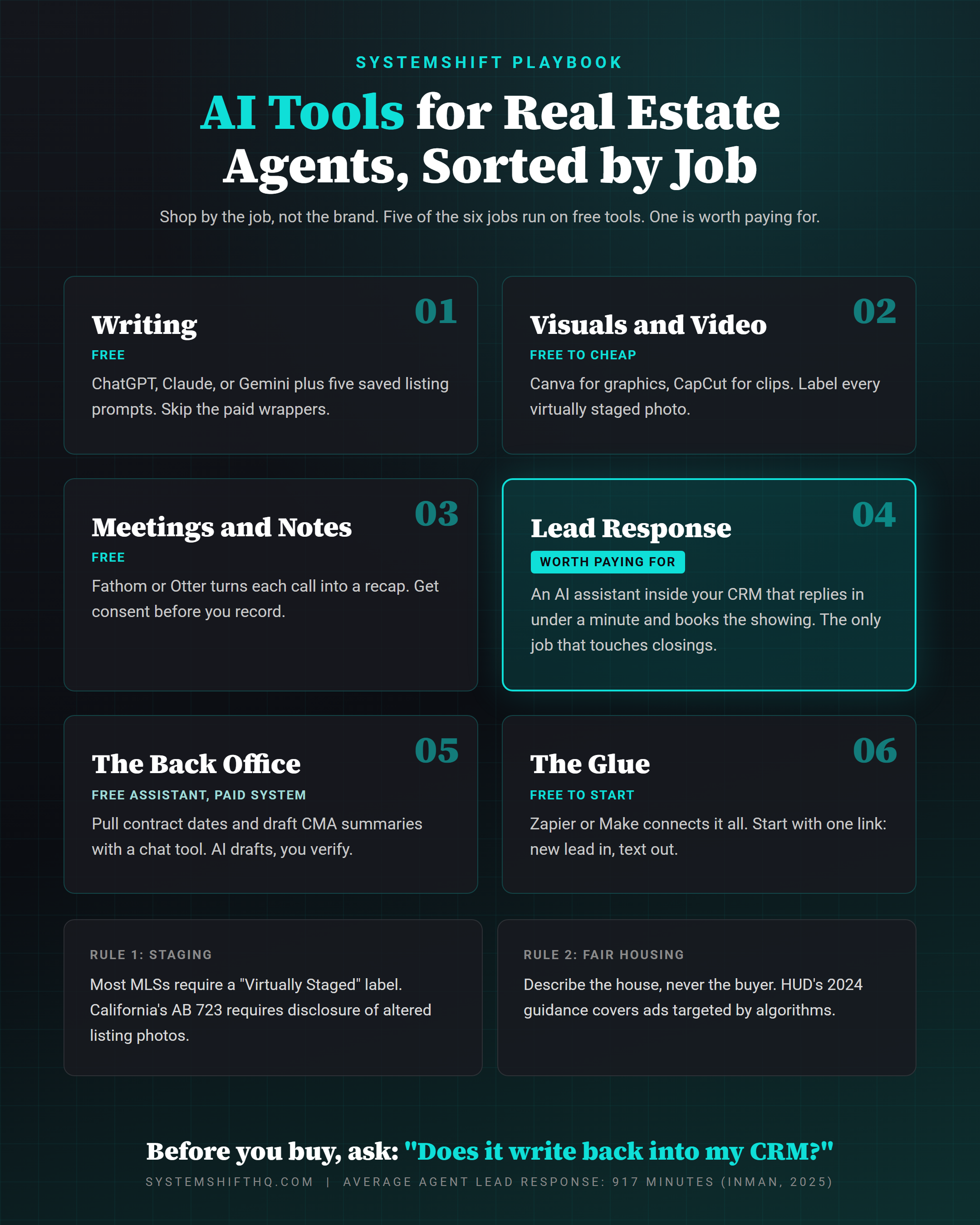
- Six jobs: writing, visuals, meetings, lead response, the back office, and the glue that connects them.
- Four of the six run on free tools. ChatGPT, Claude, or Gemini covers the writing job on its own.
- Lead response is the one job worth real money, because it is the only one that touches closings.
- Two rules to know before you publish anything AI touched: label virtually staged photos, and check AI copy and ad targeting against the Fair Housing Act.
- Before you buy any real estate AI tool, ask one question: does it write back into my CRM?
Most agents shopping for AI tools for real estate agents are asking the wrong question.
They ask, "Which tool is best?" The better question is, "Which job am I hiring it for?"
Because here's what happens when you shop by brand. You end up with four subscriptions, three logins, and a listing description writer that does the same thing as the free ChatGPT tab you already had open. Meanwhile the lead that came in at 9:40 last night is still sitting there.
NAR's 2025 Technology Survey found ChatGPT is already the most used AI tool among agents, at 58%. Gemini sits at 20% and Copilot at 15%. So most of you already own the most important writing tool on this list, and it cost nothing.
The question is what else you actually need.
The 6 jobs AI tools for real estate agents actually do
Every AI tool pitched to you does one of six jobs. Sort them this way and the buying decision gets simple.
- Writing: listing copy, emails, social captions, market updates.
- Visuals and video: photo edits, virtual staging, short clips.
- Meetings and notes: call recaps and next steps.
- Lead response: replying to every inquiry in under a minute and booking the showing.
- The back office: contract dates, CMA summaries, showing feedback.
- The glue: the connections that move data between all of the above.
Jobs 1, 2, 3, and 6 have strong free options. Job 4 is where you should spend. Job 5 sits in the middle.
Job 1: Writing (free, and you probably already have it)
ChatGPT, Claude, and Gemini all have free tiers, and all three write a solid listing description from a property sheet. You do not need a paid real estate AI writing tool that is a thin wrapper around one of them.
What makes the free version work is the prompt, not the tool.
Build five saved prompts and run every listing through all of them:
- The MLS description
- The social caption
- The just-listed email to your sphere
- The property page copy
- The postcard
You put one property sheet in, you get five drafts out, and you spend about fifteen minutes editing them.
One rule that matters here: AI writes like the internet, and the internet is full of phrases that break fair housing rules. "Perfect for a young family." "Great for empty nesters." "Walking distance to St. Mary's." Read every AI draft for words that describe the buyer instead of the property. Describe the house. Never describe who should live in it.
Job 2: Visuals and video (free to cheap, with one trap)
Canva's free plan handles listing flyers, social graphics, and quick edits. CapCut's free plan turns a phone walkthrough into a captioned 30 second clip. Between the two, most agents can stop paying a designer for day-to-day posts.
Virtual staging is where agents get in trouble.
AI staging tools are good now. An empty living room becomes a furnished one in a minute. But most MLSs require a visible "Virtually Staged" label on every altered photo, and fines for skipping it run into the thousands. California went further with AB 723, which requires disclosure of digitally altered images in listing ads and a link to the original photos.
So the rule is simple. Stage it, label it, and keep the originals.
Job 3: Meetings and notes (free)
Buyer consultations, listing appointments, and lender calls all end the same way. Somebody has to remember what was said.
Free AI notetakers like Fathom and Otter join your Zoom or Google Meet, transcribe the call, and hand you a summary with action items. That summary becomes the follow-up email, drafted before you hang up.
Two cautions. Get consent before you record, because several states require every party on the call to agree. And never let the notetaker send anything on its own. It writes the draft, and you decide what goes out.
Job 4: Lead response (the one worth paying for)
This is the job that separates the agents who feel AI in their income from the ones who only feel it in their typing.
Inman's 2025 technology survey put the average agent's lead response time at 917 minutes. That is more than fifteen hours. The MIT lead response study found a lead contacted within five minutes is 21 times more likely to qualify than one contacted at thirty.
No writing tool fixes that. A chat window cannot answer a lead at 9:40 p.m. while you are at your kid's game.
What fixes it is an AI assistant for real estate agents that lives inside your CRM. It replies to every inquiry in under a minute, references the actual property, asks one qualifying question, and books the showing onto your calendar. When a lead is ready for a human, it hands the whole thread to you.
Most major real estate CRMs, including Follow Up Boss, Lofty, and kvCORE, now offer some version of an AI texting layer, either built in or through an add-on. We also build these directly on GoHighLevel and connect them to whatever CRM a team already runs.
This is the tool to spend money on, because it is the only one on this list that touches closings. Everything else saves you time. This one saves you deals.
If you want the full sequence, I broke it down step by step in speed to lead automation.
Job 5: The back office (free assistant, paid system)
Contract to close runs on deadlines: the inspection, the appraisal, the loan commitment, and closing. Miss one and you are having a very bad conversation with your client.
You can get halfway there for free. Upload an executed contract to ChatGPT or Claude and ask for every date and deadline in a list. Do the same with twelve showing feedback emails and ask for three sentences you can send the seller. Paste your comps and ask for a first-draft CMA summary.
AI drafts, and you verify. A contract date pulled wrong is worse than no summary at all, so check every date against the document.
The paid version is a system that does this without you asking. It reads the contract when it lands, pulls the dates, and texts the right party three days before each one. That lives in your transaction platform plus an automation layer, and it is worth building once your volume makes the spreadsheet a liability.
Job 6: The glue (free to start)
This job never shows up on the "top 10 AI tools" lists, and it matters more than most of the tools on them.
Your tools do not talk to each other. The lead comes in on Zillow, lives in your CRM, gets a showing on your calendar, and the notes sit in a notetaker nobody opens again. Every handoff between those apps is a place a lead falls through the cracks.
Zapier and Make both have free plans that connect most of the tools above. Start with one connection: new lead in, instant text out, task on your calendar. That one link does more than any single tool on this page.
The best AI tools for real estate agents: the $0 starter stack
If you are starting from nothing, this covers five of the six jobs without a new bill:
| Job | Free tool | What it replaces |
|---|---|---|
| Writing | ChatGPT, Claude, or Gemini | Paid AI writing wrappers |
| Visuals | Canva, CapCut | A designer for daily posts |
| Meetings | Fathom or Otter | Typing notes after every call |
| Back office | ChatGPT or Claude with file upload | Reading contracts line by line for dates |
| Glue | Zapier or Make free plan | Copying leads between apps |
| Lead response | No good free option | The 15 hour reply |
That last row is the whole point. The free stack makes you faster. It does not make you answer faster, and answering faster is where the money is.
Free AI tools for real estate agents vs. paid: the one question to ask
Before you pay for any real estate AI tool, ask the vendor one thing:
"Does it write back into my CRM?"
If the answer is no, it is a toy. It creates one more place where information lives and one more thing you have to check. Your CRM is the central nervous system of your business. Any tool that does not feed it is working against it.
If the answer is yes, ask the follow-up: "What happens when a lead replies at 11 p.m.?" The right answer is "it answers, qualifies, and books." The wrong answer is "it sends you a notification."
One more rule before you run any AI-driven ads. In May 2024, HUD issued guidance confirming the Fair Housing Act applies to housing ads targeted by algorithms. If an ad platform's AI quietly keeps your listing away from families with children or a specific neighborhood, that is on you, not the algorithm. Keep targeting broad and location based.
What to do this week
Do not buy anything yet.
First, audit what you already pay for. Most agents are paying for at least one tool that duplicates the free ChatGPT tab.
Second, time your response. Send a test inquiry through your own website at 9 p.m. tonight and note when the first reply lands. If it is tomorrow, you just found the only AI tool you need to buy.
Third, build your five listing prompts in the free tool you already use. That is thirty minutes, once, and it pays back on every listing after.
For the bigger picture on where AI fits in your business, start with AI for real estate agents: 8 ways it actually works. And if you want the lead response system built and connected to your CRM, this is what we build for real estate agents. Bring your response time number to the call. I will tell you what it is costing you.
FAQ
What are the best AI tools for real estate agents?
Sort them by job. For writing, ChatGPT, Claude, or Gemini on a free plan. For visuals, Canva and CapCut. For meeting notes, Fathom or Otter. For connecting apps, Zapier or Make. For lead response, an AI assistant inside your CRM, which is the one job worth paying for.
Are there free AI tools for real estate agents that actually work?
Yes. Five of the six jobs have a solid free option: writing, visuals, meeting notes, back office drafting, and connecting your apps. The one job without a good free tool is instant lead response, because it has to live inside your CRM and run around the clock.
Is ChatGPT enough for real estate agents?
ChatGPT is enough for writing and for summarizing contracts, comps, and feedback. It is not enough for lead response, because a chat window cannot reply to a lead at 9 p.m. or book a showing on your calendar. For that you need an AI assistant connected to your CRM.
Do I have to disclose AI virtual staging?
Almost always, yes. Most MLSs require a visible "Virtually Staged" label on altered photos, and California's AB 723 requires disclosure of digitally altered images in listing ads. Label every staged photo and keep the originals.
Ready to Automate Your Business?
Book a free strategy call and we'll map out exactly what to build first.
Book Your Call
Join the Conversation