

If you've ever paid for a CRM and used it as a very expensive address book, you're in good company.
I build CRMs and text follow-up systems for real estate agents, mostly in GoHighLevel. The most common thing I hear on a first call isn't "my CRM can't do it." It's "I know it can do it, I just never got it set up." The software was fine. The setup never happened.
That's the part that changed this fall. An AI CRM for real estate used to mean a CRM with a chatbot stuck on the side. As of October 2026, it can mean a CRM where the AI does the building. So let's look at what that really looks like, what it still can't do, and what you should decide on instead.
Why agents quit powerful CRMs
Here's the honest version of how it usually goes.
You sign up for a platform that can do everything. You open the automation builder. It asks you to pick a trigger, then an action, then a filter, then a wait step, then which pipeline, which stage, which tag, and which user gets the task. You need to know the answer to all of that before the first text ever goes out.
So you build half a workflow on a Sunday and get pulled into a listing appointment. Two weeks later, a lead fills out your form at 9 p.m. and nobody texts them back until Thursday.
That gap matters. A Harvard Business Review study of 1.25 million sales leads found that companies that tried to reach a lead within an hour were nearly seven times as likely to qualify that lead as companies that waited longer. A workflow you never finished can't respond in an hour, or ever.
That's why so many agents traded a powerful system for a simple one that does less but runs by Friday. For years, that was a smart trade.
What changed in October 2026
GoHighLevel spent October going straight after setup. These came out in its October 2026 release notes, and most of them are opt-in Labs features, so you turn them on yourself.
- Workflows built from one sentence, with your real account data. You describe what you want, and AI Builder builds it. According to HighLevel's changelog, if you name a form, pipeline, tag, snippet, or user in your prompt, it finds that exact item in your account and sets up the step with it. You don't get a skeleton to finish. You get the workflow.
- It tests its own work. After AI Builder builds the workflow, you click Test in the same chat. HighLevel says the test runs for real, each step reports its result on the canvas, and the builder explains what happened (LevelUp Day recap).
- Lead agents set up from a description. "Build with AI" creates a Conversation AI agent from a few sentences, or you can start from one of 9 specialized templates. HighLevel's changelog says it adds the triggers, channels, booking and hand-off actions, knowledge base, instructions, and opening message for you.
- The agent texts first. Conversation AI agents can now start the conversation when a form is submitted, a contact is created, a tag is added, or a deal is created or moved to a new stage. If the lead goes quiet or asks you to check back later, the agent can send up to 5 follow-ups on its own timing.
- Old leads, three clicks. AI Campaigns let you reach a list from your Contacts page in three clicks, and each opening text is written from that contact's history with you.
- Your pick of AI model. Agents can now run on Anthropic's Claude or Google's Gemini as well as OpenAI's models. It's an opt-in beta for now.
Put those together and the hardest part of using a full platform, the setup, is now the part the platform does.
AI CRM for real estate: the old way vs the new way
The difference is easiest to see side by side.
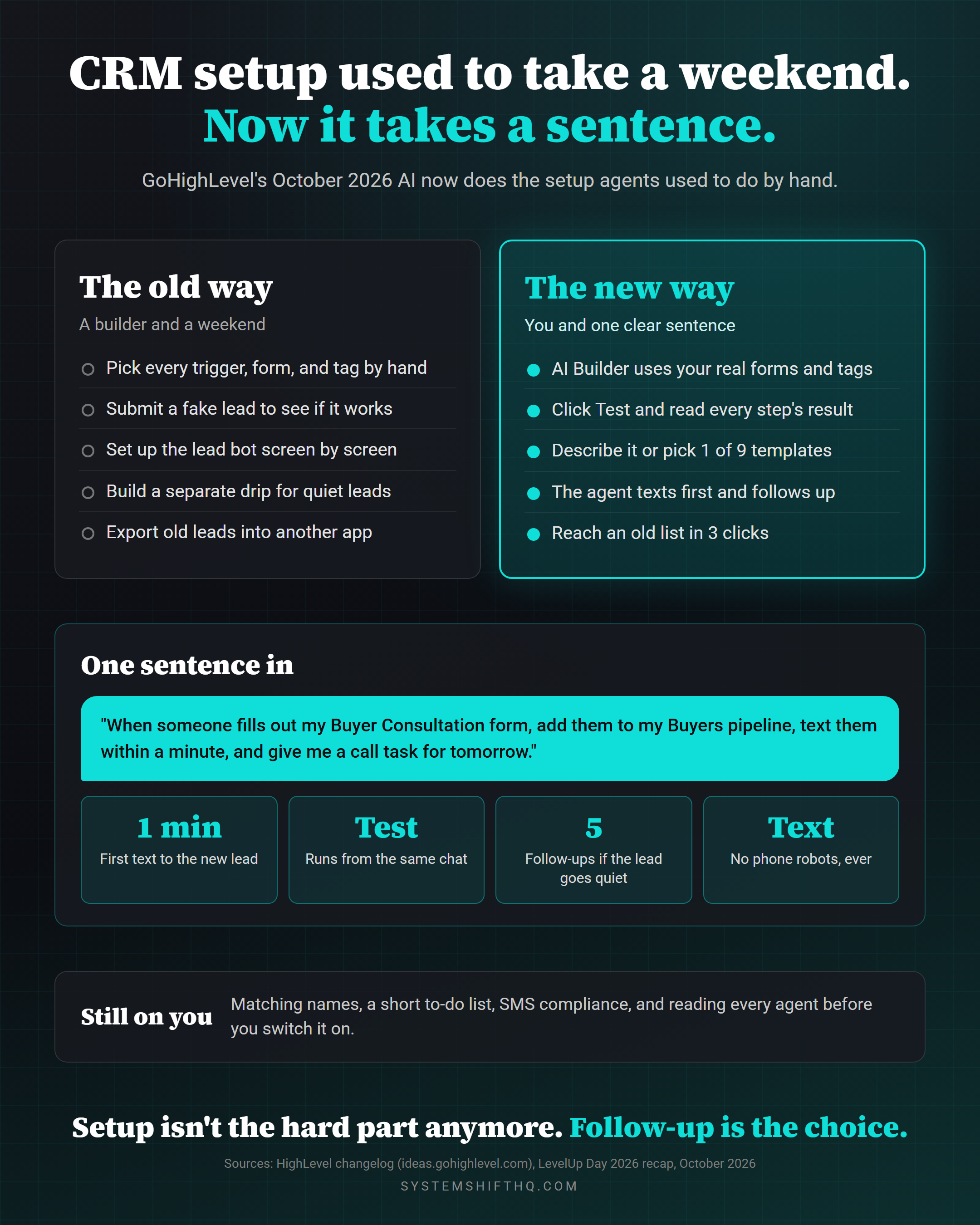
| The job | The old way | The new way (October 2026) |
|---|---|---|
| Text every new web lead within a minute | Build a workflow trigger by trigger, pick the form, write the text, map the fields | Describe it in one sentence. AI Builder finds your form and builds the steps |
| Check that it works | Submit a fake lead, wait, and dig through logs | Click Test in the same chat and read each step's result on the canvas |
| Answer lead questions and book showings by text | Write a long prompt, then set triggers, channels, hours, and hand-offs screen by screen | Describe the agent or pick one of 9 templates. "Build with AI" sets it up |
| Follow up when a lead goes quiet | A separate drip you have to build and keep updated | The agent sends up to 5 follow-ups based on what the lead said |
| Wake up a database that's been sitting since 2023 | Export, clean, load into a texting tool, write a script | AI Campaigns: pick the list, pick the agent, start |
| Who you needed | A builder and a weekend | You and a clear sentence |
What one sentence actually gets you
I'm not going to hand you our prompts or walk through our builds click by click. That's the work clients pay for. But here's the kind of result that now starts with one sentence.
Say you type something like this: "When someone fills out my Buyer Consultation form, add them to my Buyers pipeline in the New Lead stage, tag them buyer-web, text them within a minute from me, and give me a task to call them tomorrow morning."
Before October, AI Builder would give you the outline, and you'd still go step by step picking the form, the pipeline, the stage, the tag, and the user. Now it finds those exact things in your account and fills them in. Then you click Test, and the canvas shows you which steps ran and what each one did.
The lead agent works the same way. You describe it in a few sentences: who it talks to, what it can answer, when it books, and when it hands the conversation to you. It comes back set up and switched off, so you can read it and test it before it ever talks to a real person.
The result is that a buyer who fills out your form at 9:40 on a Tuesday night gets a personal text before they've closed the tab. If they ask whether the house has a fenced yard, the agent answers from your listing info. If they want to see it, it offers times and books one. If they go quiet, it checks back in. You wake up to a booked showing instead of a name you have to chase.
Everything I build for agents runs on text and email. No phone robots, and you approve how it talks before it talks to anyone.
What the AI still won't do for you
Setup isn't gone, it's just a lot smaller. Here's what's still on you.
- Your names have to match. HighLevel says plainly that AI Builder can only use records that already exist in your account, and the names in your prompt have to match. If your form is called "Buyer Consult v2," say that.
- Some steps still need you. Credentials and a few settings land on a post-generation to-do list, so plan on a few minutes of cleanup.
- Texting first needs compliance. Outbound agents send by SMS, and turning them on requires a sending number and an SMS compliance confirmation. If your number isn't registered for business texting yet, start there.
- Agents start switched off. That's a good thing. Read every agent's instructions before you turn it on, and make sure it knows when to hand off to you.
- It's beta. Most of these features live in Labs, so expect changes.
- It doesn't know your business. The AI can build a follow-up plan. It can't tell you whether your sphere wants a market update every month or a check-in twice a year. That judgment is still yours.
The AI took away the weekend of clicking, not the thinking.
The question that decides it now: which system runs your follow-up?
For years, choosing a real estate CRM came down to one tradeoff. Simple tools were easy to start and limited. Powerful tools could do anything, if you could get them set up.
AI setup takes most of that tradeoff away. A full platform is now about as quick to start as a simple one. So the deciding question isn't "which one can I set up?" anymore. It's "which one actually runs my follow-up, for every lead, for as long as it takes?"
When you compare options, ask these:
- Does it text a new lead first, within a minute, without me?
- Does it keep following up when the lead goes quiet, and stop when they reply?
- Are my website forms, texts, emails, calendar, and pipeline in the same place, or am I connecting five tools?
- Can I wake up my old leads without exporting them into another app?
- Who owns the data if I change brokerages?
If you're weighing GoHighLevel against a dedicated real estate CRM, I broke that down in Follow Up Boss vs GoHighLevel, and there's a wider look at the options in best CRM for realtors. Price matters too, so check Follow Up Boss pricing and GoHighLevel pricing in 2026 before you decide.
Is an AI CRM for real estate worth it for you?
It's probably worth it if:
- You've bought a powerful CRM before and never finished setting it up.
- Leads come in at night and on weekends, and some of them wait until Monday.
- You have a database of past clients and old leads you haven't texted in a year.
- You're paying for a CRM, a website, a texting tool, and an email tool, and you want one bill.
It's probably not worth it yet if:
- You get a handful of leads a month and you already reply to every one within minutes.
- Your brokerage requires you to work leads in its own system and you can't connect anything to it.
My take
The best CRM was always the one that actually got set up. That used to favor the simple tools, because setup on the powerful ones was a real job.
That job just got a lot smaller. When a sentence builds the workflow and a description builds the lead agent, picking a limited tool to save yourself setup time doesn't make much sense anymore. Pick the system that will run your follow-up when you're at a showing, at dinner, or asleep, and let the AI handle the clicking.
For more on what AI can take off your plate, read AI tools for real estate agents: the 6-job stack and speed to lead automation.
FAQ
What is an AI CRM for real estate?
An AI CRM for real estate is a CRM that uses AI to do work you used to do by hand. In 2026 that includes building workflows from a written description, texting new leads first, answering their questions, booking appointments, and following up when they go quiet. GoHighLevel's October 2026 releases added AI that also builds and tests the setup itself.
Can AI really set up my CRM from one sentence?
For a lot of workflows, yes. GoHighLevel's AI Builder builds a workflow from a description and now uses the real forms, pipelines, tags, and users in your account. A few settings, like credentials, still land on a to-do list, and the names in your prompt need to match what's in your account.
Is GoHighLevel good for real estate agents?
GoHighLevel is a strong fit for agents who want their CRM, website, forms, texting, email, calendar, and follow-up in one account. Its biggest drawback was always setup time, and its October 2026 AI tools take on most of that work. Teams that live in a dialer all day may still prefer a dedicated real estate CRM.
Does the AI call my leads?
Not the way I set it up. GoHighLevel's new outbound lead agents send their messages by SMS. Every system I build for agents runs on text and email follow-up that sounds like you, and you approve how the agent talks before it's turned on.
Are these GoHighLevel AI features free?
Most of them are opt-in Labs features right now. HighLevel flags Build with AI as a feature that may affect billing, and texts and AI usage are billed on a usage basis on top of your plan. GoHighLevel plans start at $97 a month according to its pricing page.
Bottom line
Setup used to be the reason powerful CRMs ended up as address books. In October 2026, GoHighLevel's AI started doing the setup, which means the real choice is about which system runs your follow-up every day without you.
If you want to see what that looks like for your business, or you're paying for a CRM that never got set up, grab a time with me. I'll look at what you have and tell you what I'd build.
Ready to Automate Your Business?
Book a free strategy call and we'll map out exactly what to build first.
Book Your Call
Join the Conversation